Building an Event-Driven Agentic AI Security Investigator
Automating incident triage, clustering, and pull-request creation using Bedrock and vector embeddings
#Alert Fatigue and Response Time
Security operations centers (SOC) are flooded with hundreds of false-positive alerts every day. When an incident is real, triage delay directly increases exposure risk. We set out to automate the mundane workflow steps: sorting alerts, determining correlation, writing incident summaries, and proposing patches.
#The Agentic Triage Pipeline
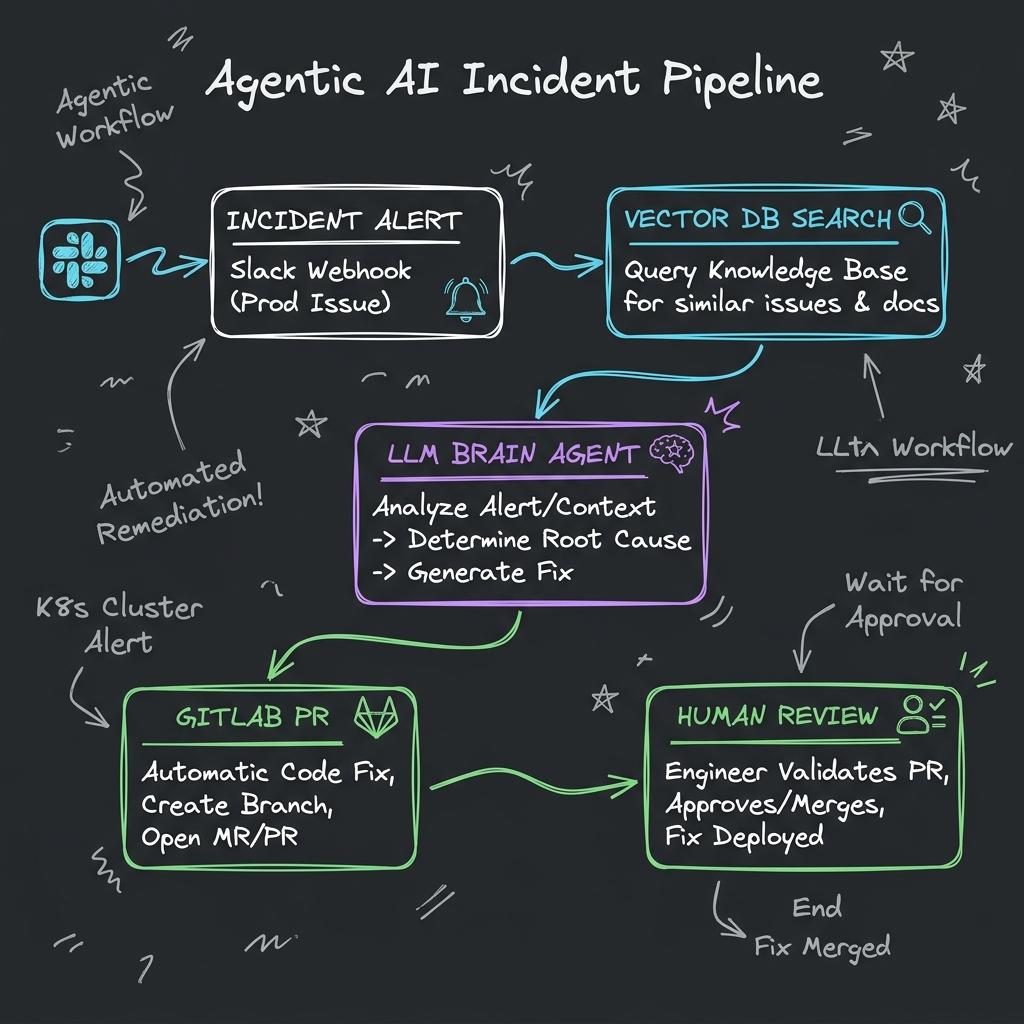
// Agentic Triage Architecture: Ingestion from Slack, correlation via vector embedding searches, LLM decision reasoning, and automated GitLab MR code generation.
#Architecture of the AI Investigator
The AI Investigator is an event-driven system built on Python and LangChain, orchestrated via AWS Step Functions. It acts as an autonomous agent configured with specific tools (APIs) to query telemetry, create tickets, and open code patches.
# Conceptual core agent loop utilizing LangChain and Bedrock LLM
from langchain_aws import ChatBedrock
from langchain.agents import initialize_agent, AgentType

llm = ChatBedrock(model_id="anthropic.claude-3-sonnet-v1:0", model_kwargs={"temperature": 0.0})

# Custom tools defined for the security agent
tools = [
    QueryTelemetryLogsTool(),
    CreateJiraTicketTool(),
    GenerateGitLabPatchTool(),
    NotifySlackChannelTool()
]

agent = initialize_agent(
    tools,
    llm,
    agent=AgentType.STRUCTURED_CHAT_ZERO_SHOT_REACT_DESCRIPTION,
    verbose=True
)

def handle_incoming_alert(alert_event):
    # Prompt constructs reasoning task with alert context
    prompt = f"Investigate alert: {alert_event['id']}. Determine root cause and generate a patch."
    agent.run(prompt)
Embedding-Based Alert Clustering
To prevent duplicate tickets, we convert incoming alert log lines into vector embeddings using AWS Bedrock's embedding model. We index these vectors in an Amazon OpenSearch vector database. When a new alert arrives, we perform a cosine similarity search; if similarity exceeds 0.85, the alert is appended to an existing incident ticket rather than creating a new one.
#Human-in-the-Loop Governance
For security reasons, we do not allow the AI agent to push code directly to main branches. The agent instead creates a new branch, commits the suggested fix, and generates a Merge Request (MR) in GitLab. The MR contains the generated Root Cause Analysis (RCA) and a detailed summary of why the code fix was suggested. An engineer must manually review, approve, and merge the code.